How to Log In as an International Student on EXAM Master Ai and Access Premium Features for Free!
How to Log In as an International Student on EXAM Master Ai and Access Premium Features for Free!
How to Log In as an International Student on EXAM Master Ai and Access Premium Features for Free!If you are an international student looking for a comprehensive platform to test your skills, challenge friends, and compete globally, EXAM Master Ai is the ultimate solution. The best part? Currently, all premium features on this portal are absolutely free of cost for international students!
In this step-by-step guide, we will walk you through the entire process—from logging in to activating your premium plan and participating in international test competitions.
If you are an international student looking for a comprehensive platform to test your skills, challenge friends, and compete globally, EXAM Master Ai is the ultimate solution. The best part? Currently, all premium features on this portal are absolutely free of cost for international students!
In this step-by-step guide, we will walk you through the entire process—from logging in to activating your premium plan and participating in international test competitions.
Step 1: Access the Student Portal
To begin, open your browser and navigate to the official login link: 👉 portal.exammasterai.com
Step 2: Log In as an International Student
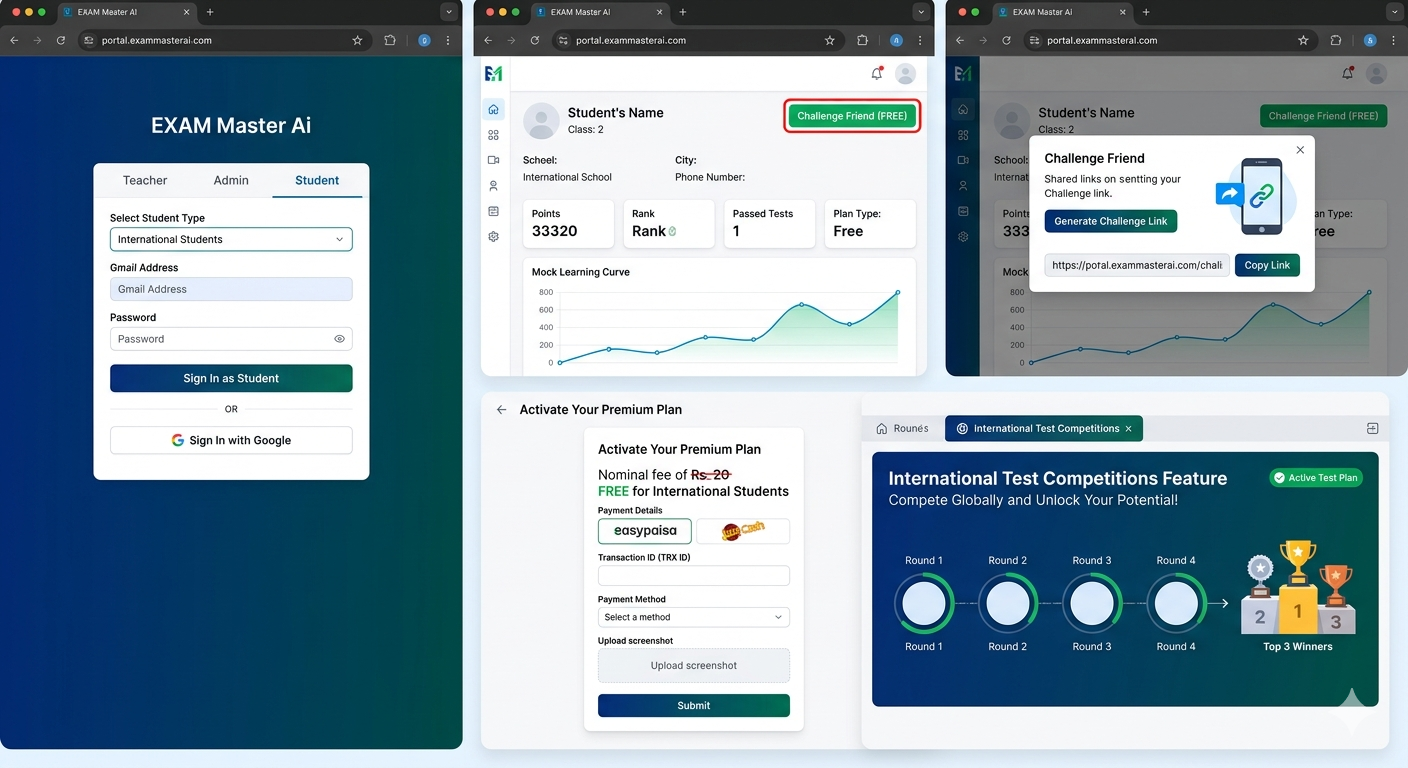
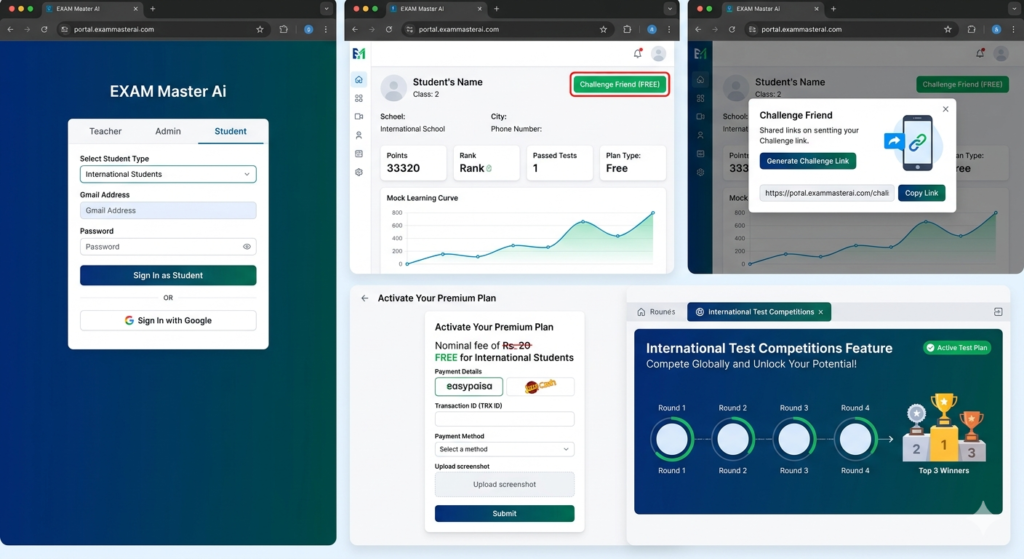
- On the main login page, you will see three tabs: Teacher, Admin, and Student. Click on Student.
- Under the “Select Student Type“ dropdown, select International Students.
- Enter your registered Gmail address and Password.
- Click on the Sign In as Student button.
Within a few seconds, you will be redirected to your personal dashboard.
Exploring Your Student Dashboard
Once logged in, the NTC Platform dashboard will display your complete academic bio-data, including:
- Your Name, Class, School, City, and Phone Number.
- Key Metrics: Points, Rank, Passed Tests, and current Plan type.
- Performance Graph: A dynamic chart that updates automatically after you take tests to show your learning curve.
Feature 1: “Challenge Friend” (100% Free)
One of the most exciting features of EXAM Master Ai is the ability to compete live with your classmates.
- Click on the green Challenge Friend (FREE) button at the top right of your dashboard.
- Click on Generate Challenge Link.
- Click Copy Link and share it with your friend via WhatsApp or any social platform.
As soon as your friend clicks the link, a real-time, competitive test will start for both of you. The student with the higher score wins!
🚨 Anti-Cheating Security Note: To ensure complete transparency, the portal records both video and microphone activity during tests. If you try to switch to another tab or browser, you will receive exactly two warnings. A third attempt will automatically disqualify and log you out of the test.
Feature 2: How to Activate Your Premium Plan (Refundable Policy)
Although the system shows a nominal fee of Rs. 20 for the premium plan (which offers unlimited tests for 1 month), this plan is entirely free for international students through a full refund policy. Here is how to complete the formality:
- Click on Get Premium Now on your dashboard.
- Check the provided payment details (JCB, EasyPaisa, or JazzCash).
- Submit the transaction and enter your Transaction ID (TRX ID) on the page.
- Select your payment method, upload a screenshot of your receipt, and click Submit.
Our admin team will instantly receive a notification, approve your request, and completely refund the amount back to your account, granting you full premium access for free!
Feature 3: International Test Competitions
Once your premium status shifts to “Active Test”, you can participate in major online competitions featuring 4 comprehensive rounds (Round 1 to Round 4).
Passing each round unlocks the next criteria. Ultimately, the Top 3 Winners are selected globally and honored with special awards directly through the portal!
Tag:Anti-Cheating Online Test, Challenge Friend Feature, Exam Master AI, Free Premium Student Plan, How to use EXAM Master Ai, International Student Portal, Live Quiz Competition, NTC Platform Dashboard, Online Test Competitions 2026, portal.exammasterai.com, Student Portal Login, Student Premium Registration