
The Ultimate Fiverr Success & Client Hunting Masterclass: The Complete Blueprint to Rank Gigs, Land High-Paying Clients, and Scale Your Freelance Business
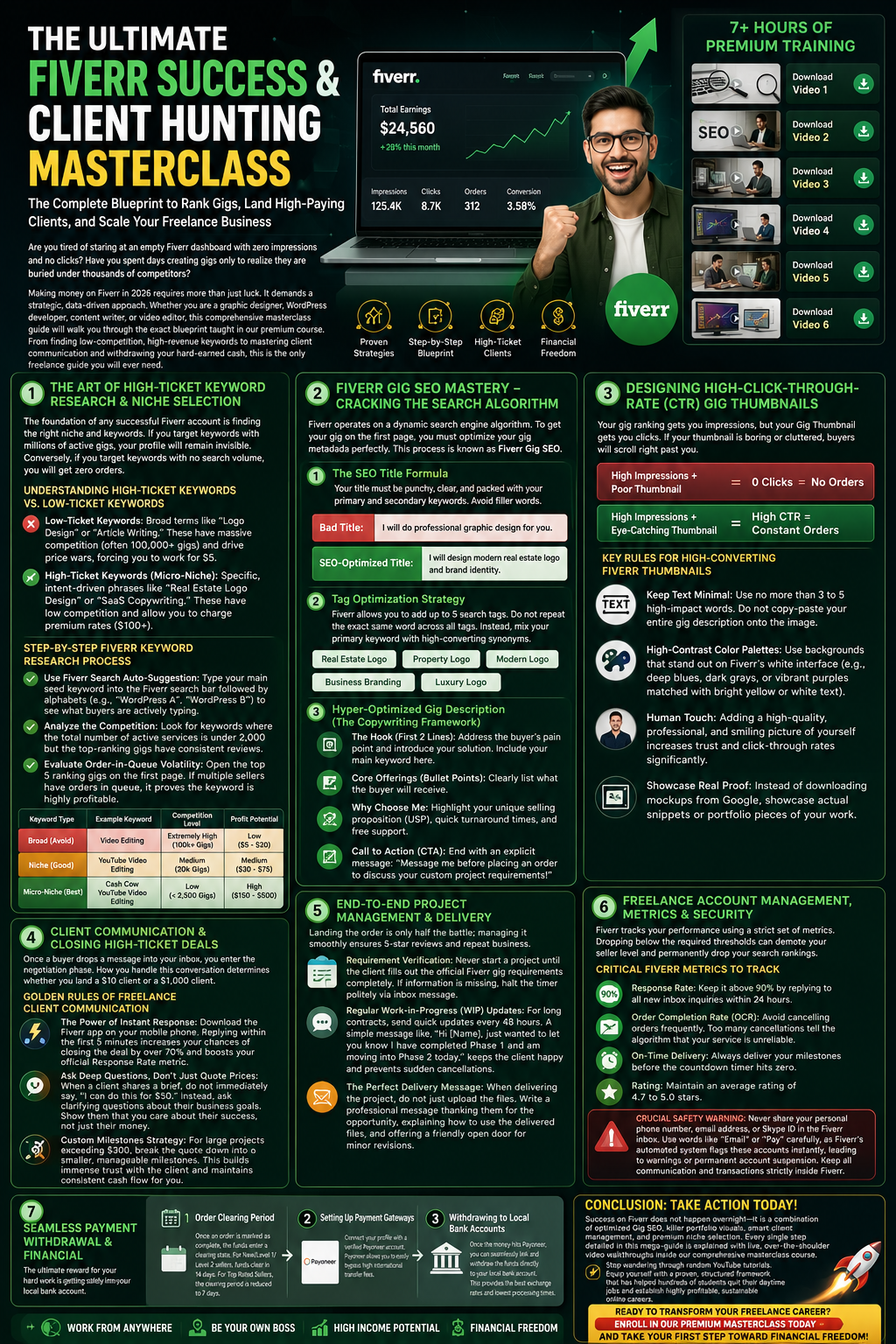
The Ultimate Fiverr Success & Client Hunting Masterclass: The Complete Blueprint to Rank Gigs, Land High-Paying Clients, and Scale Your Freelance Business
Are you tired of staring at an empty Fiverr dashboard with zero impressions and no clicks? Have you spent days creating gigs only to realize they are buried under thousands of competitors?
Making money on Fiverr in 2026 requires more than just luck. It demands a strategic, data-driven approach. Whether you are a graphic designer, WordPress developer, content writer, or video editor, this comprehensive masterclass guide will walk you through the exact blueprint taught in our premium course. From finding low-competition, high-revenue keywords to mastering client communication and withdrawing your hard-earned cash, this is the only freelance guide you will ever need.
Download video 1
Download video 2
Download video 3
Download video 4
Download video 5
Download video 6
Download video 7
Module 1: The Art of High-Ticket Keyword Research & Niche Selection
The foundation of any successful Fiverr account is finding the right niche and keywords. If you target keywords with millions of active gigs, your profile will remain invisible. Conversely, if you target keywords with no search volume, you will get zero orders.
Understanding High-Ticket Keywords vs. Low-Ticket Keywords
-
Low-Ticket Keywords: Broad terms like “Logo Design” or “Article Writing.” These have massive competition (often 100,000+ gigs) and drive price wars, forcing you to work for $5.
-
High-Ticket Keywords (Micro-Niche): Specific, intent-driven phrases like “Real Estate Logo Design” or “SaaS Copywriting.” These have low competition and allow you to charge premium rates ($100+).
Step-by-Step Fiverr Keyword Research Process
-
Use Fiverr Search Auto-Suggestion: Type your main seed keyword into the Fiverr search bar followed by alphabets (e.g., “WordPress A”, “WordPress B”) to see what buyers are actively typing.
-
Analyze the Competition: Look for keywords where the total number of active services is under 2,000 but the top-ranking gigs have consistent reviews.
-
Evaluate Order-in-Queue Volatility: Open the top 5 ranking gigs on the first page. If multiple sellers have orders in queue, it proves the keyword is highly profitable.
| Keyword Type | Example Keyword | Competition Level | Profit Potential |
| Broad (Avoid) | Video Editing | Extremely High (100k+ Gigs) | Low ($5 – $20) |
| Niche (Good) | YouTube Video Editing | Medium (20k Gigs) | Medium ($30 – $75) |
| Micro-Niche (Best) | Cash Cow YouTube Video Editing | Low (< 2,500 Gigs) | High ($150 – $500) |
Module 2: Fiverr Gig SEO Mastery – Cracking the Search Algorithm
Fiverr operates on a dynamic search engine algorithm. To get your gig on the first page, you must optimize your gig metadata perfectly. This process is known as Fiverr Gig SEO.
1. The SEO Title Formula
Your title must be punchy, clear, and packed with your primary and secondary keywords. Avoid filler words.
-
Bad Title: I will do professional graphic design for you.
-
SEO-Optimized Title: I will design modern real estate logo and brand identity.
2. Tag Optimization Strategy
Fiverr allows you to add up to 5 search tags. Do not repeat the exact same word across all tags. Instead, mix your primary keyword with high-converting synonyms.
-
Primary Tag: Real Estate Logo
-
Synonym Tags: Property Logo, Modern Logo, Business Branding, Luxury Logo
3. Hyper-Optimized Gig Description (The Copywriting Framework)
Your description needs to clear the buyer’s doubts and convince them to buy while naturally placing keywords.
-
The Hook (First 2 Lines): Address the buyer’s pain point and introduce your solution. Include your main keyword here.
-
Core Offerings (Bullet Points): Clearly list what the buyer will receive.
-
Why Choose Me: Highlight your unique selling proposition (USP), quick turnaround times, and free support.
-
Call to Action (CTA): End with an explicit message: “Message me before placing an order to discuss your custom project requirements!”
Module 3: Designing High-Click-Through-Rate (CTR) Gig Thumbnails
Your gig ranking gets you impressions, but your Gig Thumbnail gets you clicks. If your thumbnail is boring or cluttered, buyers will scroll right past you.
High Impressions + Poor Thumbnail = 0 Clicks = No Orders
High Impressions + Eye-Catching Thumbnail = High CTR = Constant Orders
Key Rules for High-Converting Fiverr Thumbnails
-
Keep Text Minimal: Use no more than 3 to 5 high-impact words. Do not copy-paste your entire gig description onto the image.
-
High-Contrast Color Palettes: Use backgrounds that stand out on Fiverr’s white interface (e.g., deep blues, dark grays, or vibrant purples matched with bright yellow or white text).
-
Human Touch: Adding a high-quality, professional, and smiling picture of yourself increases trust and click-through rates significantly.
-
Showcase Real Proof: Instead of downloading mockups from Google, showcase actual snippets or portfolio pieces of your work.
Module 4: Client Communication & Closing High-Ticket Deals
Once a buyer drops a message into your inbox, you enter the negotiation phase. How you handle this conversation determines whether you land a $10 client or a $1,000 client.
Golden Rules of Freelance Client Communication
-
The Power of Instant Response: Download the Fiverr app on your mobile phone. Replying within the first 5 minutes increases your chances of closing the deal by over 70% and boosts your official Response Rate metric.
-
Ask Deep Questions, Don’t Just Quote Prices: When a client shares a brief, do not immediately say, “I can do this for $50.” Instead, ask clarifying questions about their business goals. Show them that you care about their success, not just their money.
-
Custom Milestones Strategy: For large projects exceeding $300, break the quote down into smaller, manageable milestones. This builds immense trust with the client and maintains consistent cash flow for you.
Module 5: End-to-End Project Management & Delivery
Landing the order is only half the battle; managing it smoothly ensures 5-star reviews and repeat business.
Managing Project Timelines Successfully
-
Requirement Verification: Never start a project until the client fills out the official Fiverr gig requirements completely. If information is missing, halt the timer politely via inbox message.
-
Regular Work-in-Progress (WIP) Updates: For long contracts, send quick updates every 48 hours. A simple message like, “Hi [Name], just wanted to let you know I have completed Phase 1 and am moving into Phase 2 today,” keeps the client happy and prevents sudden cancellations.
-
The Perfect Delivery Message: When delivering the project, do not just upload the files. Write a professional message thanking them for the opportunity, explaining how to use the delivered files, and offering a friendly open door for minor revisions.
Module 6: Freelance Account Management, Metrics & Security
Fiverr tracks your performance using a strict set of metrics. Dropping below the required thresholds can demote your seller level and permanently drop your search rankings.
Critical Fiverr Metrics to Track
-
Response Rate: Keep it above 90% by replying to all new inbox inquiries within 24 hours.
-
Order Completion Rate (OCR): Avoid cancelling orders frequently. Too many cancellations tell the algorithm that your service is unreliable.
-
On-Time Delivery: Always deliver your milestones before the countdown timer hits zero.
-
Rating: Maintain an average rating of 4.7 to 5.0 stars.
Crucial Safety Warning: Never share your personal phone number, email address, or Skype ID in the Fiverr inbox. Use words like “Email” or “Pay” carefully, as Fiverr’s automated system flags these accounts instantly, leading to warnings or permanent account suspension. Keep all communication and transactions strictly inside Fiverr.
Module 7: Seamless Payment Withdrawal & Financial Management
The ultimate reward for your hard work is getting that money safely into your local bank account.
Step-by-Step Payment Flow
-
Order Clearing Period: Once an order is marked as complete, the funds enter a clearing state. For New/Level 1/Level 2 sellers, funds clear in 14 days. For Top Rated Sellers, the clearing period is reduced to 7 days.
-
Setting Up Payment Gateways: Connect your profile with a verified Payoneer account. Payoneer allows you to easily bypass high international transfer fees.
-
Withdrawing to Local Bank Accounts: Once the money hits Payoneer, you can seamlessly link and withdraw the funds directly to your local bank account. This provides the best exchange rates and lowest processing times.
Conclusion: Take Action Today!
Success on Fiverr does not happen overnight—it is a combination of optimized Gig SEO, killer portfolio visuals, smart client management, and premium niche selection. Every single step detailed in this mega-guide is explained with live, over-the-shoulder video walkthroughs inside our comprehensive masterclass course.
Stop wandering through random YouTube tutorials. Equip yourself with a proven, structured framework that has helped hundreds of students quit their daytime jobs and establish highly profitable, sustainable online careers.
Ready to transform your freelance career? Enroll in our premium masterclass today and take your first step toward financial freedom!
Instructor

You May Like
The Ultimate Free Facebook Monetization Masterclass Guide
The Ultimate Free Facebook Monetization Masterclass Guide. The Ultimate Facebook Monetization Masterclass: The Complete Blueprint from Page Setup to Your First Bank Payout (100% Free)...

AI Question Generator
A WordPress LMS Plugin to create WordPress Learning Management System. Turn your WP to LMS WordPress with Courses, Lessons, Quizzes & more.

ExamMaster AI: The Ultimate All-in-One Exam & Online Competition Portal
ExamMaster AI is a revolutionary platform designed for schools and academies, covering everything from Class 1 to Class 12. Our smart engine ensures that every...

ExamMaster AI – Secure Testing & Anti-Cheat Portal
Upgrade your school’s examination standards with ExamMaster AI, the most advanced assessment ecosystem in Pakistan. This module focuses on our high-tech Online Testing Portal, which...

Mastering ExamMaster AI: A Complete Guide for Educators
This tutorial will introduce you to PHP, a server-side scripting language you can use to make dynamic websites and web applications.