



The Power of Paper Presentation: How to Format Answers for Maximum Board Exam Marks
Master the art of exam paper presentation. Learn how structuring headings, separating lines, and using professional digital layouts can boost student marks and credibility.
Introduction
In the academic world, knowing the correct answer is only half the battle. The other half is how effectively you showcase that knowledge to the examiner. This is where Presentation becomes the ultimate differentiator. Whether an examiner is checking a physical handwritten paper or reviewing an online assessment layout, a clean, organized, and structured presentation instantly signals high quality and competence.
For students looking to maximize their marks in Class 9, 10, or intermediate board exams, or for educators displaying academic results to parents, mastering professional layout principles is essential. This guide uncovers the psychological impact of clean paper presentation, practical tips for structured answer writing, and how modern platforms ensure professional layout standards.
Why Presentation Matters to Examiners
Examiners often have hundreds of sheets, essays, or digital tests to grade within a limited timeframe. A messy, unorganized layout with cramped handwriting and no clear sections creates immediate mental fatigue for the grader.
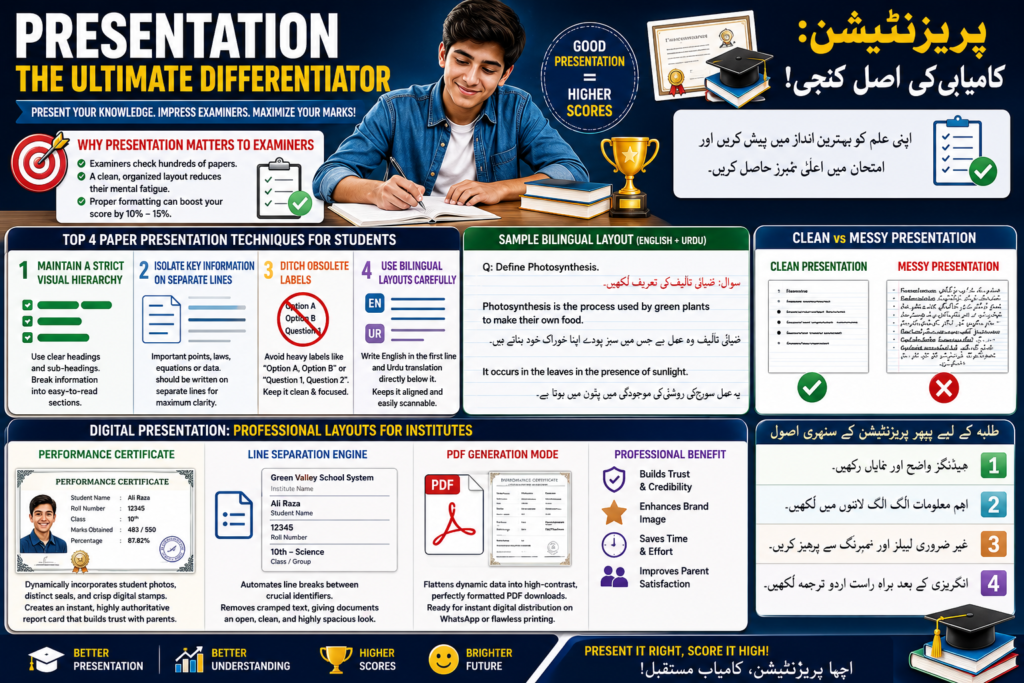
Conversely, an excellent presentation acts as a visual map. When key terms are highlighted, headings are distinct, and important details stand out dynamically, it allows the examiner to verify your answers at a single glance. Proper formatting can easily boost a student’s score by 10% to 15%, turning an average paper into an outstanding one.
Top 4 Paper Presentation Techniques for Students
1. Maintain a Strict Visual Hierarchy
Never write long, dense walls of text. Instead, break your answers down using clear, hierarchical headings. Use bold main headings for the primary question and sub-headings for secondary details or examples. This breaks down information into digestible, easy-to-read sections.
2. Isolate Key Information on Separate Lines
When presenting critical credentials, definitions, or equations, never crowd them into a single prose paragraph. Important structural elements—such as a specific law in Physics, a code block in Computer Science, or even formal data layouts—should be placed on separate lines. For example, keeping titles, main values, and supporting data visually distinct ensures maximum clarity and spacing.
3. Ditch Obsolete Labels (Clean Structure)
Modern presentation rules favor a clean aesthetic over cluttered labeling. For instance, when attempting Multiple Choice Questions (MCQs) or structured lists, avoid repeating heavy sequential labels like “Option A, Option B” or “Question 1, Question 2” right next to the options if the platform or paper template already numbers them. Keep the text clean and directly focused on the content.
4. Use Bilingual Layouts Carefully
For students studying in regional or bilingual systems (such as the Punjab Textbook Board or Virtual University models), presenting translations smoothly is an art. The most professional approach is to write the English text clearly in the first line, followed immediately by the Urdu translation directly below it. This synchronized pattern maintains textbook alignment and makes the sheet exceptionally scannable.
Digital Presentation: Professional Layouts for Institutes
Presentation isn’t just for students; it is equally vital for school owners and academy administrators. When displaying student results, certificates, or financial account information at administrative desks or public areas (like a petrol pump service center or school front desk), the layout must be flawless.
Modern educational tools like Exammasterai automate this entire presentation process through smart formatting engine features:
| Presentation Feature | Visual Layout Standard | Professional Benefit |
| Performance Certificate | Dynamically incorporates student photos, distinct seals, and crisp digital stamps. | Creates an instant, highly authoritative report card that builds trust with parents. |
| Line Separation Engine | Automates line breaks between crucial identifiers like Institute Name, Student Name, and Roll Number. | Removes cramped text, giving the documents an open, clean, and highly spacious look. |
| PDF Generation Mode | Flattens dynamic data into high-contrast, perfectly formatted PDF downloads. | Ready for instant digital distribution on WhatsApp channels or flawless physical printing. |
Conclusion
Excellent presentation bridges the gap between what you know and how others perceive your intelligence. By training yourself to use structured headings, separating important data onto distinct lines, keeping translations beautifully aligned, and relying on professional digital layouts, you elevate the value of your work. Spend that extra effort on formatting—whether on a board exam sheet or a digital dashboard—and let your hard work shine clearly!
Focus Tags for this Post (Single Paragraph)
paper presentation tips, exam formatting guide, exammasterai, how to score board exams, clean answer writing, visual hierarchy in education, bilingual exam layout, professional certificate design, student report card format, improving paper layout, academic data presentation, scannable study notes, digital certificate printing, educational sheet alignment, spacing tips for exams